Disclosure: I’m part of the ActiveCampaign affiliate program. This post has an affiliate link. If you sign up through it, I may earn a commission at no extra cost to you. Everything below comes from a real test I ran myself.
I spend a few hours every week on email marketing for my clients. Writing subject lines, staring at a blank draft, taking wild guesses at send times, building out the same kind of campaign I’ve built a dozen times before. The process is time consuming.
So when I heard about Active Intelligence, ActiveCampaign’s tool for what they call Autonomous Marketing, the idea being that you type a goal and get a finished campaign back. I wanted to actually try it instead of just reading about it.
Here’s what happened, including the part that surprised me.
What I Typed In
I signed up for ActiveCampaign’s free trial and found a box at the bottom of the dashboard that said “Build with Active Intelligence.” I typed one sentence:
“Create a win-back email campaign for subscribers who haven’t opened an email in 60 days.”
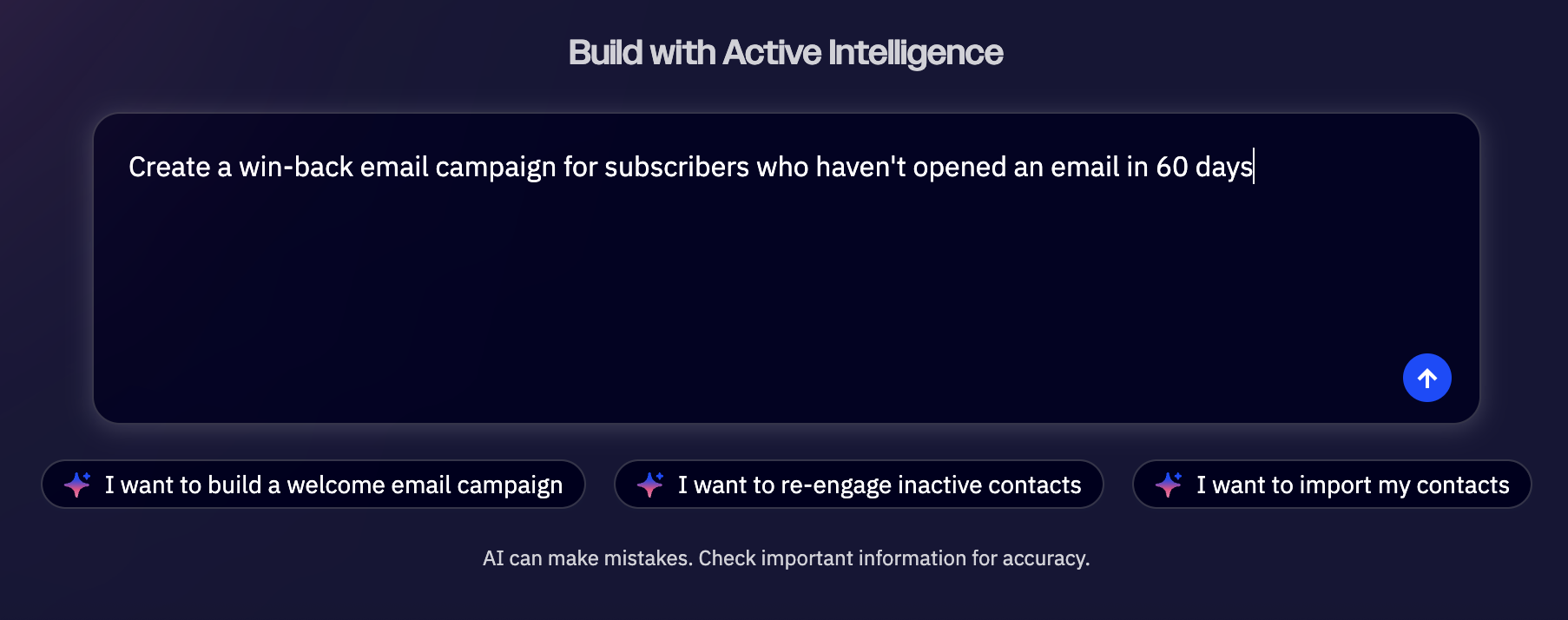
Then I hit the arrow button and sent in the request.
Building a Win-Back Email Campaign With Active Intelligence
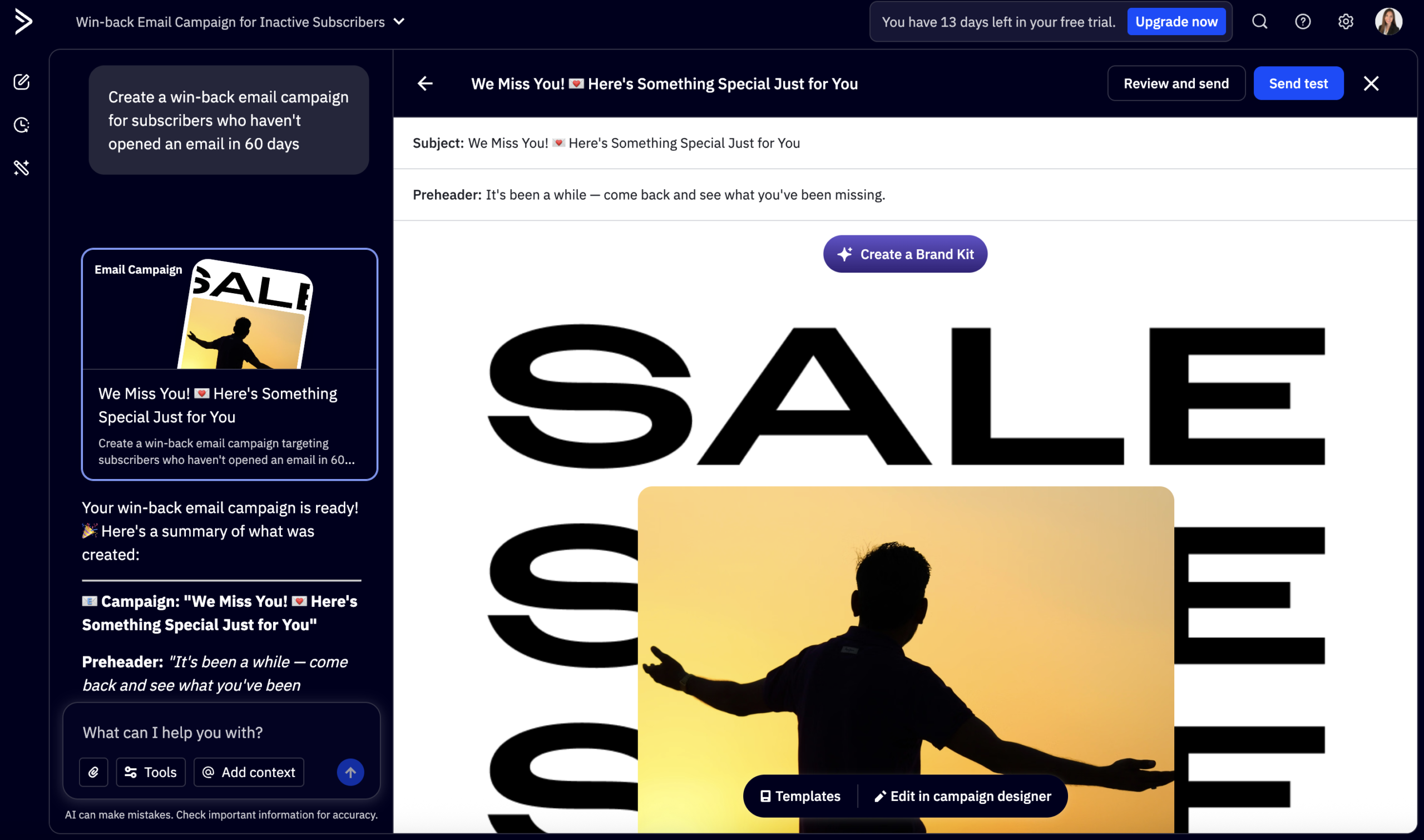
Within about a minute, it had written a full, ready-to-send email with a subject line, a preheader, body copy, an offer section, and a call to action button.
Here’s exactly what it gave me in the AI output:
- Subject line: “We Miss You! 💌 Here’s Something Special Just for You”
- Preheader: “It’s been a while — come back and see what you’ve been missing.”
- A personalized hero section using my subscriber’s first name
- Body copy that acknowledged the time away without sounding guilt-trippy
- An incentive section offering a discount as a “welcome back” gesture
- A closing line reassuring people they’re still welcome
- A CTA button that said “Reconnect & Claim Your Offer”
I want to be honest about something here. I expected a full multi-email sequence right away, three emails, spaced out, fully automated. Instead, it built one really solid email and then asked me what I wanted to do next, which ended up being more useful than I expected.
The Part I Didn’t Expect
After the email was done, it gave me a short list of tips instead of just stopping:
- Build a segment of subscribers with no opens in the last 60 days, since the email alone doesn’t target anyone yet
- Consider pairing it with a follow-up email for people who still don’t open it after 7 to 10 days
- Add an unsubscribe prompt, since giving disengaged people an easy way out actually helps deliverability and list health long-term
That last point caught me off guard. I would not have thought to suggest an unsubscribe option as a way to improve results. My instinct would have been to just send to everyone and hope for the best. The AI’s advice was basically: don’t chase people who clearly don’t want to be chased, because it hurts you more than it helps.
It then asked if I wanted it to build the segment, set up a follow-up sequence, or edit the email further. I hadn’t asked for any of that. It just offered, the way a coworker might say “want me to also handle the next step?”
Asking It to Build the Actual Segment
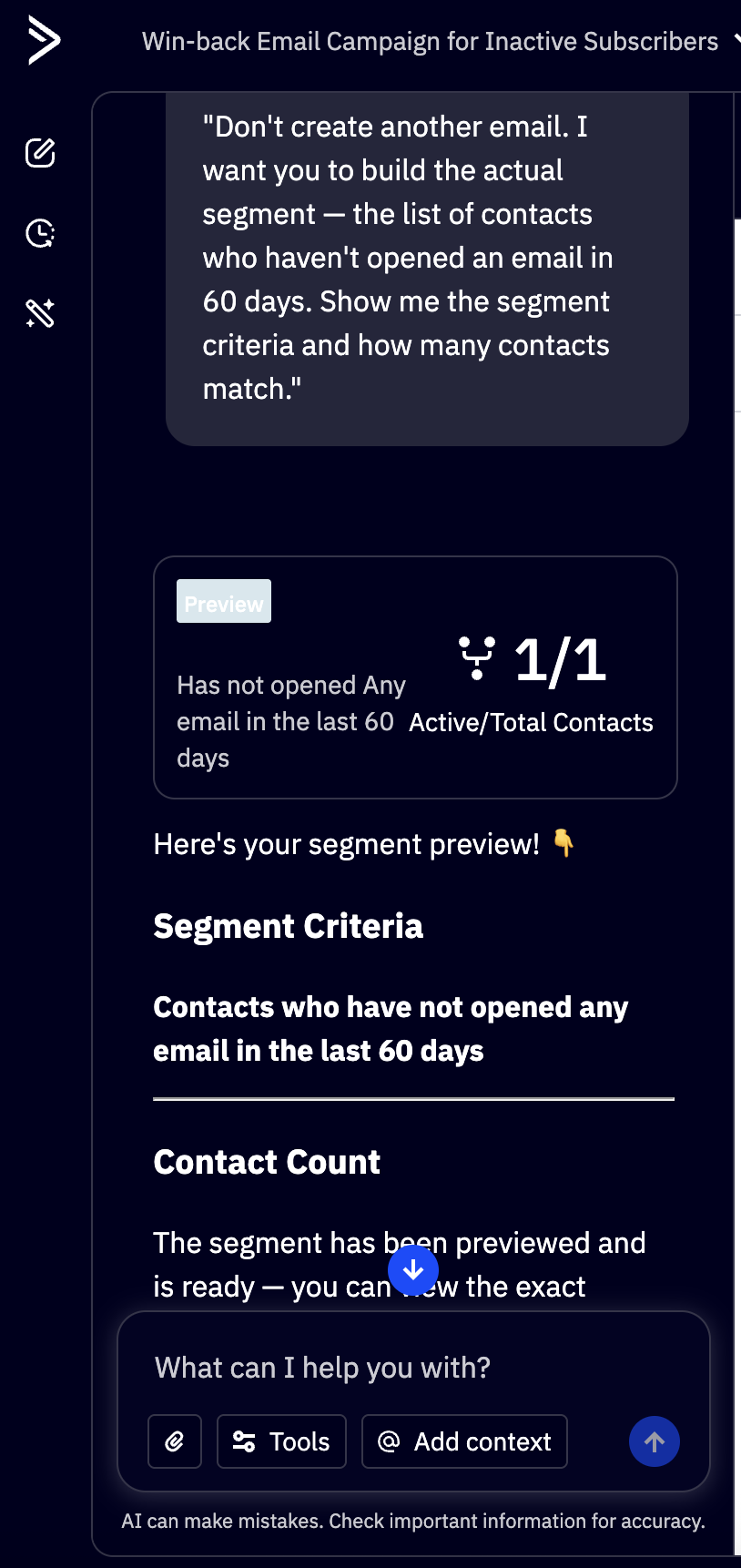
I decided to take it up on the offer, with one change. I didn’t want another email variant, I wanted to see the actual audience it would target. So I replied:
“Don’t create another email. I want you to build the actual segment, the list of contacts who haven’t opened an email in 60 days. Show me the segment criteria and how many contacts match.”
It understood the difference right away. Instead of writing more copy, it switched into building a segment and showed me the exact criteria: contacts who have not opened any email in the last 60 days.
Here’s the honest part. My trial account only has one contact in it, so the segment came back showing 1 out of 1 active contacts. That’s not a flaw in the tool, it’s just what happens since I tested something on a fresh account instead of a real list with months of subscriber history.
What mattered to me wasn’t the number. It was that the tool didn’t fake a bigger result or hide the limitation. It showed me exactly what it found, then asked if I wanted to save the segment with a name so I could use it later. I told it yes, and it saved as “Inactive – No Opens (60 Days),” ready to attach to a real campaign whenever I have an actual list to point it at.
If you’re testing this yourself on a brand new trial, expect the same thing. The workflow works. The numbers will only get interesting once you connect a real list with real history behind it.
What I Liked
The email itself sounded like something a person would write if they’d done this a hundred times before and knew exactly which buttons to push. The subject line was good. The “easy out” advice on unsubscribes was the kind of thing that takes most people a few bad campaigns to learn the hard way.
It also didn’t require me to know anything about deliverability, segmentation, or copywriting structure going in. I gave it one sentence and got something usable back in under a minute, and when I asked for something more specific, like the actual segment instead of another email, it understood the difference and switched gears without me having to explain myself twice.
How AI Email Marketing Compares to How I Normally Do It
Normally, building a win-back campaign means a few separate steps done one at a time. I write the subject line first, usually a few versions, then the body copy, then I go dig through my contacts to manually filter by last-open date, then I decide on timing, and only after all of that do I have something ready to send. Each step is its own small decision, and each one takes a few minutes longer than it should.
With this test, the order flipped. I got a finished email first, then the tool told me what step came next instead of me having to remember it myself. The segment criteria, the suggestion to add a follow-up sequence, the note about unsubscribe prompts, none of that was me hunting for best practices. It was already sitting in front of me before I asked.
That doesn’t mean it replaces judgment. I still had to tell it not to write another email when I wanted the segment instead. I still have to decide if “Reconnect & Claim Your Offer” is the right CTA for my brand, or if I’d rather write my own. The tool moves fast on the repetitive parts. The decisions still belong to me.
What I’d Tell Someone Considering This
This isn’t “set it and forget it,” and I don’t think ActiveCampaign is claiming it is. It built one piece, well, and then handed me the next decision instead of making it for me. That’s a different experience than basic automation, where you build every step yourself from scratch, but it’s also not full autopilot.
If this sounds like your week, an hour spent staring at a blank subject line field more often than you’d like, this is worth trying. It won’t build your whole strategy for you. It will get you out of the blank page a lot faster, and it’ll occasionally suggest something you wouldn’t have thought of yourself.
If you want to try Active Intelligence on your own list, ActiveCampaign offers a free trial, and the AI tools are available from the start. You can try it here.
Frequently Asked Questions
What is Active Intelligence? Active Intelligence is ActiveCampaign’s AI tool. You type a goal in plain language, like building a win-back campaign, and it writes the email and suggests next steps like audience segments.
What is autonomous marketing? Autonomous marketing is when AI builds the first version of a campaign for you, instead of you building every step by hand. You give it a goal, and it writes the content and suggests what to do next, like ActiveCampaign’s Active Intelligence does.
Is Active Intelligence the same as basic email automation? No. Basic automation runs steps you already built yourself. Active Intelligence builds the email and the segment for you first, then lets you review and edit before anything goes out.
Does Active Intelligence build the full campaign automatically? Not in my test. It built one email at a time and asked before doing more, like building a segment or a follow-up sequence. You stay in control of what happens next.
Can Active Intelligence build an email segment for me? Yes. When I asked it to build a segment of subscribers who hadn’t opened an email in 60 days, it showed the exact criteria and contact count, then let me save it with a name.
Is Active Intelligence good for AI email marketing beginners? Yes. I didn’t need to know anything about deliverability or list segmentation going in. It explained the reasoning behind its suggestions, like why adding an unsubscribe option can actually help your results.
The Bottom Line
Active Intelligence didn’t build my whole marketing strategy in one sitting. It built one good email fast, then handed me a clear next step instead of guessing what I wanted. That’s the real story, not a dramatic transformation, just less time stuck on a blank page and a few smart suggestions I wouldn’t have thought of myself.
If you are interested, here is a link to sign up for Autonomous Marketing by ActiveCampaign.